1_ Store information · guide · ~12 min read
Shopify in Poland —store setupfor Polish businesses
- Guide
- Shopify 2026
- Poland
- Admin help
A step-by-step guide — from product pages to payment setup and store policies.
A product page that sells
Why does your product page need a change?
A well-designed product page is more than a description and a price. It removes the customer’s doubts and shortens the decision. You get full control over how your offer is presented — which means fewer abandoned carts and a professional brand image.
How do you use the new product page?
It’s designed so you can manage it without technical knowledge. In the Shopify admin you get dedicated fields for key information, technical specs and customer instructions. Changes show up in real time.
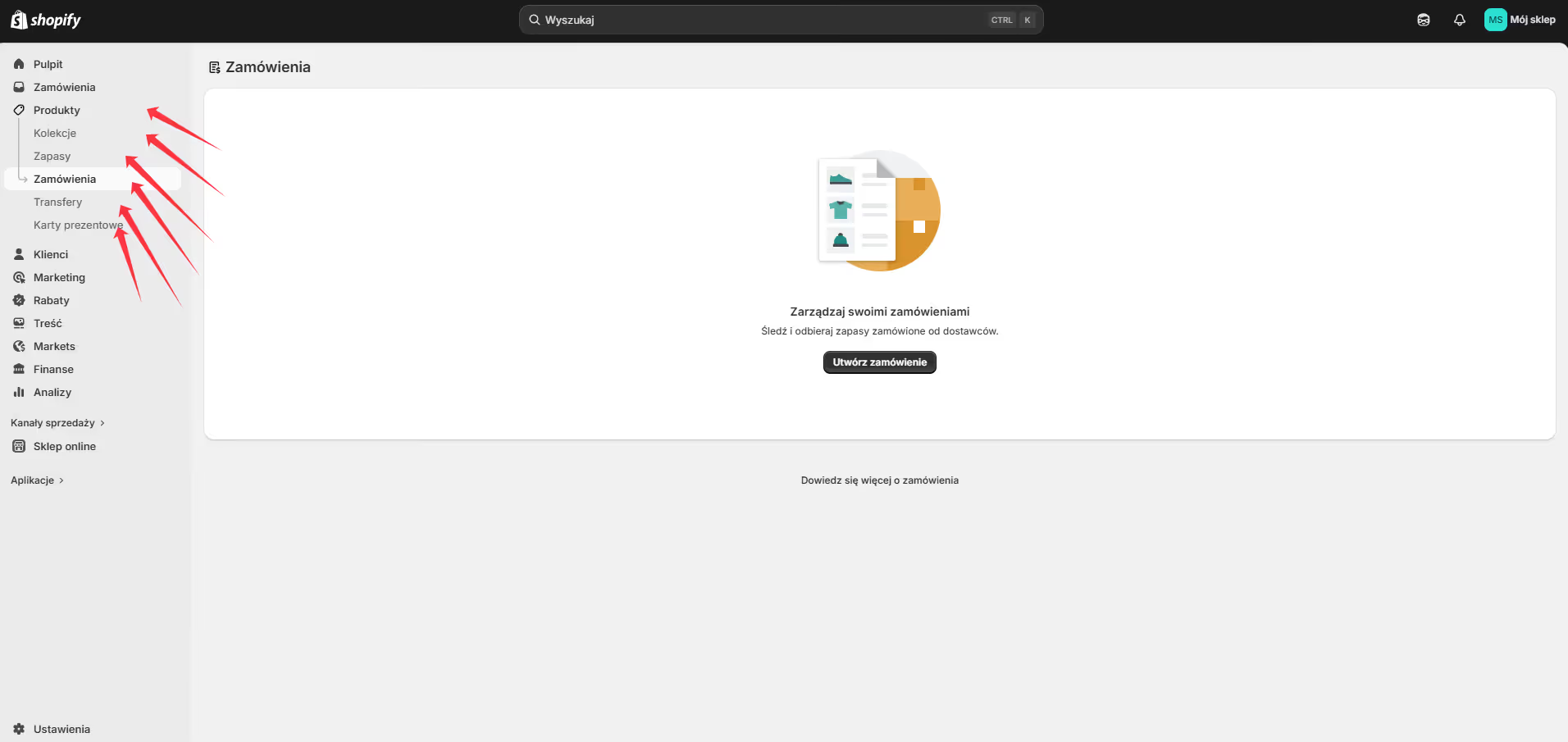
How to manage your inventory
- 01
Create the product
Go to Products → Add product. The title should communicate the main customer benefit right away — it’s the first thing shoppers see.
- 02
Benefit-focused description
Avoid dry facts. A good description builds trust with a clear spec, answers questions before the customer asks them and makes the buying decision quick.
- 03
Media and organisation
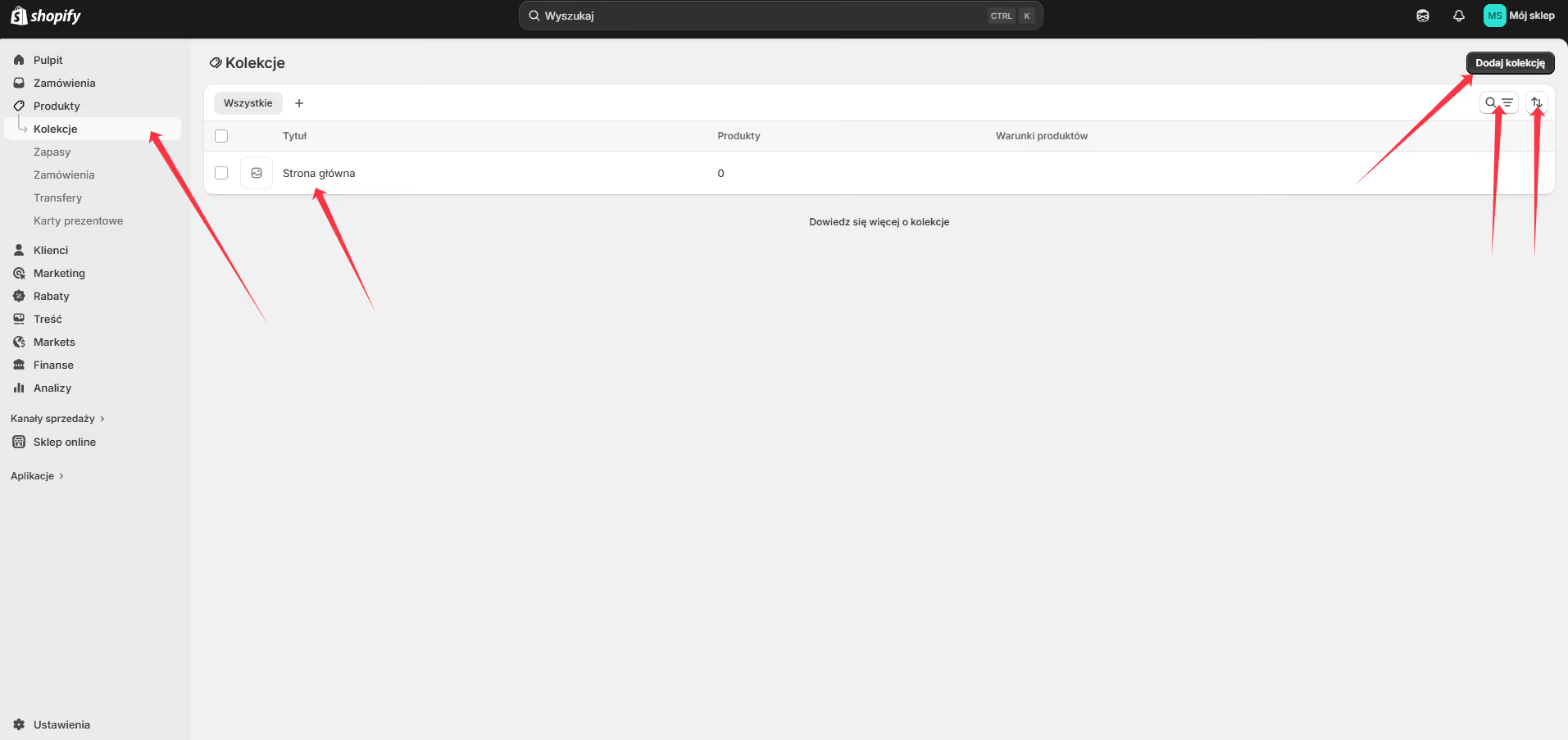
Add photos of at least 1500×1500 px. Assign the product to a collection and add SEO tags — customers will find what they need faster.
- 04
Price and variants
Enter the price and set up variants (size, colour). Shopify automatically shows the customer whether the chosen option is available — zero order mistakes.
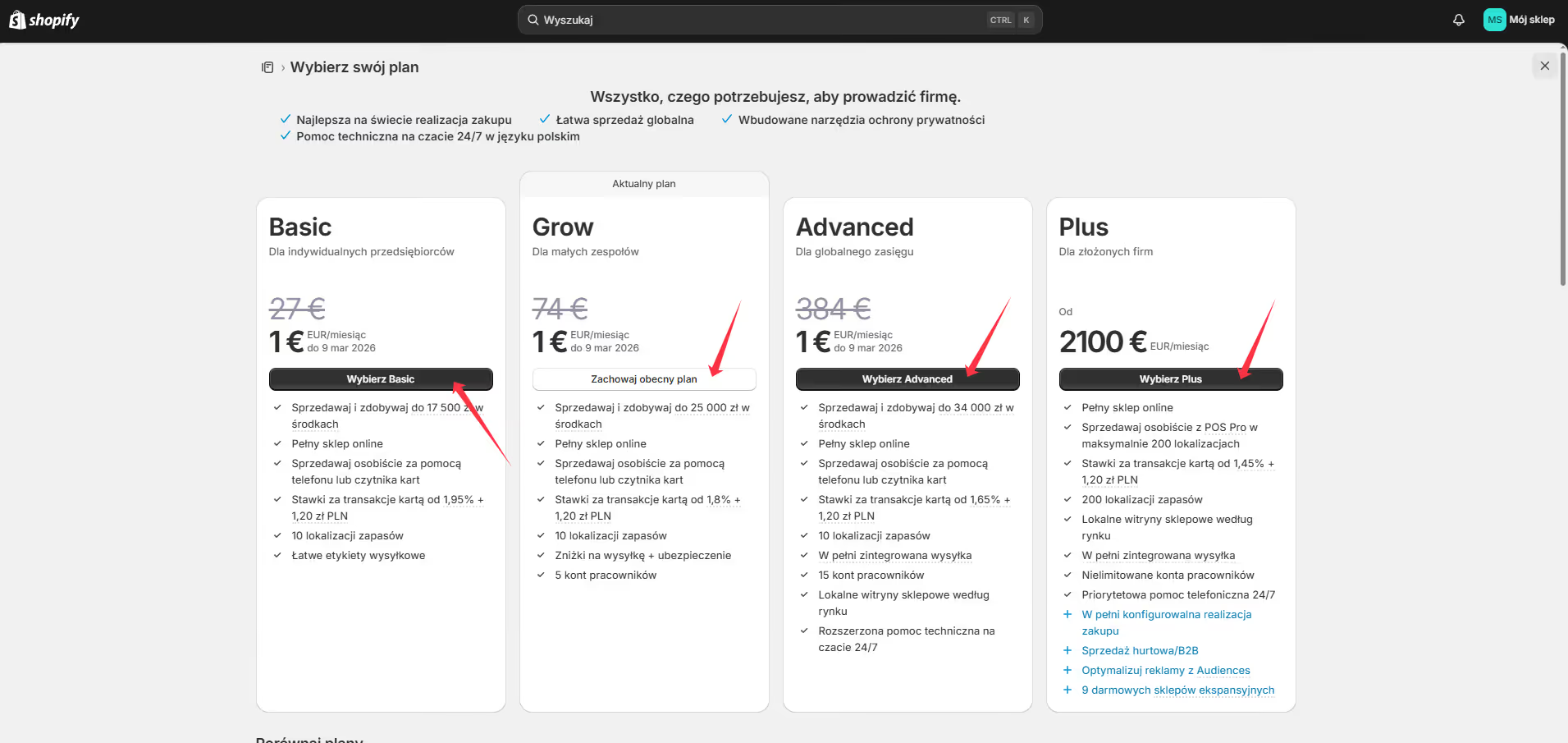
Pricing plans and extra costs
27 USD/mo
Unlimited products, 2 staff accounts, 2% transaction fee. Ideal to start.
74 USD/mo
Up to 5 accounts, professional reports, 1% fee. Recommended for growing stores.
384 USD/mo
Up to 15 accounts, custom report builder, 0.5% fee. Worth it at high turnover.
from 2100 USD/mo
Enterprise: dedicated manager, multiple stores from one admin, automations, B2B.
Extra costs
Domain (~14 USD/yr), store theme (0–350 USD), App Store apps, payment gateway fees (Przelewy24, PayU). On plans without Shopify Payments add a further 0.5–2% Shopify fee.
Which plan should you choose?
Start on Basic and move to Shopify once the store is selling regularly. Advanced only pays off when the fee savings exceed the higher plan cost. Shopify offers a 3-day trial + 1 USD for the first month.
Payment setup — BLIK, cards, wallets
Go to Settings → Payments. Shopify Payments isn’t available in Poland — set up an external gateway.
Payment gateways for Poland
- →Przelewy24 / PayU / Tpay — BLIK, instant transfers and cards. Merchant account registration takes 1–3 business days.
- →PayPal — a good choice for international customers.
Digital wallets
Manual payments
- →Bank transfer — add your account number and instructions. Fulfil the order once payment arrives.
- →Cash on delivery (courier) — very popular in Poland, builds trust and increases conversion.
Recommendation for a Polish store
Step by step: Przelewy24 integration
Shopify → Settings → Alternative payment providers → Przelewy24
1. Przelewy24 merchant account
- →Company details: NIP, REGON, KRS/CEIDG, registered address
- →Owner’s/representative’s ID card + PESEL
- →Bank account (IBAN + statement confirming ownership)
- →Store URL + link to terms and privacy policy
2. Shopify integration
- →Install the “Przelewy24” or “PayPro” app from the Shopify App Store
- →Enter the API details: Merchant ID, POS ID, CRC Key, reporting key
- →Activate it in: Settings → Payments → Alternative payment providers
3. Webhook setup (important!)
https://your-store.myshopify.com/payments/przelewy24/notifyWithout it Shopify won’t update order statuses automatically after payment.4. Test and launch
Fees
Step by step: InPost integration (parcel lockers)
Shopify App Store → InPost PL — setup and locker map
1. InPost business account
2. Install the app in Shopify
- →Install “InPost PL” or “Furgonetka” from the Shopify App Store
- →Enter the Organization ID and API key
- →Enable the parcel locker map (geowidget) — customers pick a pickup point right at checkout
3. Shipping rates
- →InPost parcel locker — ~13 PLN (1 business day)
- →InPost parcel locker + cash on delivery — ~16 PLN
- →InPost door-to-door courier — ~15 PLN
Pricing for small stores
- →Size A (8×38×64 cm): 10–13 PLN
- →Size B: 13–16 PLN
- →Size C (largest): 16–18 PLN
- →Cash on delivery: +2–3 PLN + ~2% of order value
Troubleshooting
- →Locker map not working — check the geowidget is enabled in the app settings, clear the cache
- →Label not generating — verify the API details, check the InPost account is active
- →Customer didn’t get a pickup code — check the spam folder, send the tracking number manually
Required legal documents for a Polish store
Go to Settings → Policies. All documents appear automatically in the store footer. Shopify generates templates — they need adapting to Polish law.
Required documents
- →Returns policy — 14-day right of withdrawal (statutory), return conditions and procedure, refund deadline (within 14 days of receiving the goods)
- →Privacy policy (GDPR) — what data you collect, purpose and legal basis, customer rights, controller details
- →Terms of service — purchase rules, payment methods, complaint procedures, liability
- →Shipping policy — delivery methods, costs, lead times, free-shipping conditions, service area
- →Contact details — full company name, NIP, REGON, address, email, phone
How to fill in the policies?
- →Shopify AI generator — click “Create from template”. A quick starting point, but it needs checking against Polish law and GDPR.
- →E-commerce lawyer — 1,000–3,000 PLN. Full legal certainty, especially in regulated industries.
- →My help — I prepare complete policies from your details and proven GDPR templates.
What I need to build your store
The more detail up front, the smoother the project. Confidentiality guaranteed — happy to sign an NDA.
Access details and plan
- →A Gmail address to create the Shopify account
- →Chosen plan: Basic (27 USD/mo), Shopify (74 USD/mo) or Advanced (384 USD/mo)
Company details
- →Full company name (KRS/CEIDG), NIP, REGON, registered address
- →Owner’s details: name, PESEL, ID card
- →Bank account (IBAN + proof of ownership)
- →KRS extract or CEIDG certificate (max 3 months old)
Products
- →A list in Excel/Google Sheets: name, description, price, variants, SKU, weight, stock
- →Photos of at least 1500×1500 px, ideally on a white background, from several angles
- →Product categories and SEO tags
Look and integrations
- →Logo (SVG or PNG) + colour palette (HEX codes) + inspiration examples
- →API details: Przelewy24 (Merchant ID, POS ID, CRC Key) or PayU
- →InPost API details: Organization ID + API key
- →Optional: Google Analytics, Facebook Pixel, BaseLinker/Subiekt
Legal documents
Why Shopify is a good decision — and when it isn’t
A ready store in days
No server, DevOps or developer needed. Shopify provides hosting, SSL, CDN and the admin panel — you focus on selling.
99.99% uptime — no downtime
Shopify’s infrastructure handles Black Friday and sudden traffic spikes. Your store keeps running even with thousands of shoppers at once.
8,000+ apps in the App Store
Reviews, loyalty programmes, dropshipping, BaseLinker, marketplaces — one click from integration. Most have a free plan to start.
Multichannel selling in one admin
Online store, Instagram, Facebook, TikTok Shop, Allegro — all orders in one place. Stock levels sync automatically.
Security included in the price
SSL, PCI DSS Level 1 certification, data encryption and DDoS protection — at no extra cost.
Mobile first — 67% of purchases are mobile
All Shopify themes are responsive. Checkout is optimised for phones; Apple Pay and Google Pay work as soon as they’re enabled.
Analytics and reports with no extra tools
Built-in reports on sales, abandoned carts and customer behaviour. On Advanced — a custom report builder and segmentation.
24/7 support + millions of users
Chat, email, phone and extensive docs. Every Shopify problem has a solution on a forum or YouTube.
Limitations — honestly, before you decide
— Monthly subscription
From 27 USD/mo (Basic) to 384 USD/mo (Advanced). It’s a fixed cost — whether you sell a lot or a little.
— Transaction fees in Poland
Shopify Payments isn’t available in Poland — every transaction through an external gateway (Przelewy24, PayU) costs an extra 0.5–2% Shopify fee on Basic and Shopify plans.
— Limited code customisation
Shopify uses its own Liquid language. Global theme changes require editing it — which can be hard without experience.
— App costs add up
Larger stores use 5–10 paid apps. Combined subscriptions can far exceed the base fee.
Shopify’s ToS without the jargon
You can
- Sell physical products, digital goods, subscriptions and online courses
- Run the store in any language and currency
- Use your own domain (e.g. yourstore.com)
- Export all data — products, customers, orders
- Move the store to another platform at any time
- Combine multiple sales channels in one admin
Keep in mind
- Data is stored on Shopify servers (US/EU) — a DPA is required for GDPR compliance
- The account may be temporarily suspended if a ToS breach is suspected
- When you close the account you have 90 days for a full data export
- Transaction fees can grow with sales on the lower plans
- Technical support only in English (chat/email)
Prohibited
- Illegal or counterfeit products
- Weapons, ammunition, drugs without the required licences
- Financial services without proper permits (forex, crypto without a licence)
- Adult content on standard plans (requires Shopify Plus)
- Spyware, malware
The full ToS is at shopify.com/legal/terms. In Poland GDPR is key — sign Shopify’s DPA (Data Processing Agreement), available free in your account settings.
A quick answer — before you invest
Shopify is a good choice
- ✓
A store selling physical products
From 10 to 10,000+ SKUs. Variants, inventory, shipping — all ready.
- ✓
A company without its own IT team
You manage content, products and orders without technical knowledge.
- ✓
Multichannel selling
You want to sell on your site, Instagram, TikTok and Allegro at the same time.
- ✓
A fast e-commerce start
1–3 weeks to launch. A ready store instead of a months-long project.
- ✓
Scaling without limits
Shopify Plus handles millions of transactions. Your store grows with your business.
Consider something else
- ×
You’re building a marketplace or SaaS
A multi-vendor platform needs its own backend, not off-the-shelf e-commerce.
- ×
You only sell services
A Webflow or WordPress site with a form is faster and cheaper.
- ×
Your requirements are fully custom
Custom pricing algorithms, B2B with individual contracts — better your own platform or Shopify Plus.
- ×
A minimal operating budget
If every 100 PLN a month matters — WooCommerce on cheap hosting may be better to start.
Brief / Onboarding form
Download the form to fill in
Fill it in before our meeting — details for the Shopify account, payments, shipping and integrations. Includes an NDA clause. (Form in Polish.)
Download brief PDFFree consultation · 30 min
Want to build a Shopify store for Poland?
I’ll help you set up payments, shipping and legal policies.
Book a meeting →Frequently asked questions
4 questions
What services exactly do you offer?+
Five areas that in practice usually go together:
- Websites and apps in Webflow — from a landing page to a large portal with a CMS.
- Websites, stores and apps in code — Next.js and Astro, built with the help of AI (Claude) and proven plugins.
- Stores — Webflow Ecommerce, Shopify or a mix (e.g. a Webflow or Next.js site with a Shopify cart).
- UI/UX design in Figma — mockups, design system, clickable prototype.
- Automations and AI apps — Make.com, API integrations, dashboards on Cloudflare.
Plus care for projects that are already live — including ones I didn’t build.
Webflow or Next.js / Astro — which should I choose?+
Choose Webflow when you want to edit content yourself in a comfortable visual editor and launch quickly. Next.js or Astro — when you need custom logic (dashboard, login, integrations), maximum speed, or don’t want to pay a platform subscription.
- Astro — company sites, blogs, landing pages: minimal JavaScript, great Google results.
- Next.js — apps, client portals, headless stores, anything that needs login and a database.
- AI (Claude) and ready-made libraries speed up the build, so code is no longer much more expensive than no-code — and it stays fully yours.
Not sure what fits? In a free consultation I’ll match the technology to the goal, not the other way round.
My site runs on WordPress — can it be moved?+
Yes, it’s a common scenario. I move the content, images and URL structure, and old addresses get 301 redirects so you don’t lose your Google rankings.
I don’t move plugins one-to-one though — Webflow works differently. At the start I check what your current site actually does and tell you straight what you get as standard, what needs an integration and what is better left behind in WordPress.
Your domain and email stay yours — only what they point to changes.
Automations and AI apps — what does that mean in practice?+
Automation means moving repetitive work from a person to a Make.com scenario: a form lands in a spreadsheet and CRM, an order generates a document, a new lead triggers a notification and a message.
An AI app is your own tool — a dashboard where a model summarises, classifies or generates content from your data. This site has such a client panel, and it’s my best example.
I quote this kind of work only after a conversation: without knowing the scope, any number would be made up.
How much does it cost?+
Net price ranges most projects fall into:
- Landing page
- 1,500 – 4,000 PLN
- Standard company website
- 4,500 – 7,500 PLN
- Advanced website with CMS
- 8,500 – 20,000 PLN
- Webflow or Shopify store
- 5,000 – 18,000 PLN
- UI/UX design in Figma
- 1,500 – 25,000 PLN
- Make automations
- 1,500 – 12,000 PLN
- Next.js / Astro website
- 4,000 – 12,000 PLN
- Headless Next.js store
- 9,000 – 25,000 PLN
- AI application
- 4,000 – 25,000 PLN
The full breakdown with the scope of each package is in the pricing section. I give a specific number after a short brief — the consultation costs nothing.
Why are the ranges so wide? What drives the price?+
Because “company website” means something different to everyone. The price goes up mainly with:
- Number of unique layouts — ten subpages built from the same sections cost less than three that each look different.
- CMS and filtering — a catalogue, blog or parameter search is separate work.
- Integrations — payments, inventory, CRM, booking systems.
- Content and photos — ready ones shorten the project; missing ones lengthen it more than anything else.
- Animation — simple transitions are included, a custom motion layer is not.
The lower end of a range is a specific, well-defined scope — not a version “stripped of quality”.
How do billing and payment work?+
I work on a Polish contract for specific work or a service contract. If your accounting prefers an invoice, we settle through the Useme platform — you get a regular VAT invoice and the platform handles the formalities.
Payment is normally split into two parts: a deposit to start and the rest on acceptance. Larger projects add an interim payment after the mockups are approved.
I’m paid by regular bank transfer — the account number and reference are next to the document in the client panel. I don’t run payment gateways or card payments.
How long does it take and what usually causes delays?+
- Landing page
- 5–10 business days
- Company website (5–10 subpages)
- 2–4 weeks
- Online store
- 3–6 weeks
- UI/UX design in Figma
- 1–4 weeks
You get a schedule with milestones before we start. I keep deadlines — with one caveat worth knowing up front: the project waits for content and decisions. A week of silence on the client side is a week of delay, and that is by far the most common cause of slippage. Photos and copy prepared in parallel with the design are the best investment in the deadline.
What does working together look like, step by step?+
- Consultation — a free talk about goals, scope and budget.
- Brief and quote — a short form; the offer comes back in 24–48 h.
- Mockups in Figma — a design to approve before any code.
- Build — in Webflow or Shopify, tested on phones and desktop.
- Handover — CMS training, documentation, warranty starts.
Progress, files and invoices are always up to date in the client panel — no digging through emails.
What if I don’t like the design?+
That’s why mockups come before the build — at that stage a change takes hours, not a rebuild of a finished site.
Two rounds of mockup revisions are included. If after the first round it’s clear the direction is off, I prepare an alternative proposal instead of polishing something you don’t believe in.
I start writing code only after you approve the design. It’s the one moment when the process stops and waits for your “yes”.
Do you work with clients outside Poland?+
Yes — remotely, across Poland and abroad. Radom is an address, not a limit.
We talk however suits you: email, Slack or Google Meet, in English or Polish. Decisions and files land in the client panel, so nothing gets lost in a chat thread.
What do I get at the end of the project?+
- A working site or store on your own account — the project is yours, not mine.
- Full CMS access, so you change content without a developer.
- A guide — a video recording or a PDF, your choice.
- On-page SEO: meta tags, heading hierarchy, alt texts, sitemap.
- Responsiveness checked on phone, tablet and desktop.
- Figma source files, if the project included a mockup stage.
What about warranty and support after launch?+
A 30-day warranty from handover — I fix bugs for free, no hour counter.
After that, if you like, we stay in touch:
- Hosting & domain — SSL, monitoring, backups
- 100 – 250 PLN/mo
- Basic Plan — up to 10 h per month
- 500 – 2,000 PLN/mo
- Advanced Plan — up to 25 h, growth
- from 2,500 PLN/mo
A subscription is not required. You can order a single change from the panel at any time, without a long-term commitment.
What is the client panel you mention?+
It’s your account on this site — one place instead of scattered correspondence. In it you’ll find:
- a project timeline with the current stage and deadlines,
- files and mockups to download,
- quotes and billing documents with transfer details,
- change requests and messages to me,
- access for collaborators, if you make decisions as a team.
I set up the account when we start working together — it costs nothing and works on your phone too. See the panel.